Once you have access to the simulation, the First Time User Guide takes you through the platform in the right order. In around 10 minutes, you will know how to operate the tool.
From there, you can decide how involved you want to be.
Some lecturers use the simulation in a light-touch way. Others pause between stages, discuss decisions with students, and coach more actively. The platform supports both.
The First Time User Guide
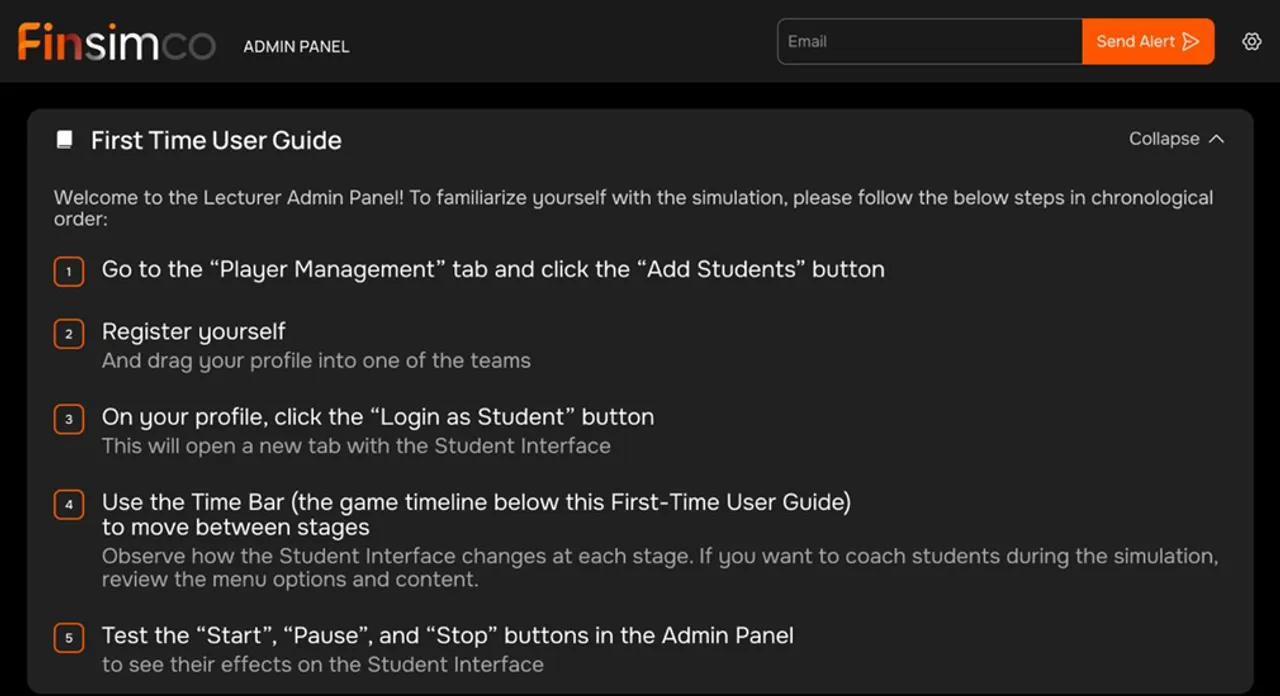
The First Time User Guide is there to make the platform familiar fast. The guide shows you the essentials:
- how to move through the simulation stages
- how to test Start, Pause, and Stop
- how to see what students see
- how to adjust stage timings
That is enough to operate the simulation.
If you want to be more actively involved in class, you can then stop at any stage and read the supporting material. This helps you understand the flow, the input decision points, and the information provided to students.
When you want to coach more actively
Once you are comfortable operating the tool using the First-Time User Guide, you can explore the built-in materials to deepen your understanding of the session. The Teaching Notes explain the key concepts, learning objectives, and overall sequence of the simulation, helping you understand the experience and coach your students more effectively.
During the simulation, Live Monitoring allows you to follow student activity in real time. You can take a more active role by monitoring their progress and pausing the simulation to provide guidance or teach specific concepts. Alternatively, you can take a more passive approach and allow the simulation to run by itself.
What your first run actually involves
During class, the simulation is largely self-running. Start the timeline, let students work through the different stages, and follow their activity in Live Monitoring.
If you prefer a more coached format, you can pause the simulation at any time to explain concepts or teach the class.
The exact stage names differ by simulation. The way you run them does not.
Your first simulation is an investment
The first simulation takes a bit of attention. After that, it gets much easier.
Most lecturers want to spend as little time as possible getting comfortable before using it with a class. The first run is the one that feels new. After that, the platform becomes routine, and you will no longer need to prepare and in class you can just observe students in action.
The good news is that this effort pays back quickly.
The admin panel is consistent across Finsimco simulations, so once you have learned one, you are not starting from zero the next time.
Support
For your first event, one Finsimco team member can stay on standby throughout the session. You can reach us by phone, WhatsApp, email, or another channel that works for you.
The reason we support the first run so closely is simple. If you feel comfortable and have a good first event, it is much more likely that you will want to use our simulations again in future.
